The Pace of Change

It was my good fortune to have been able to attend last week’s Consortium for School Networking (@CoSN) annual conference.  It was a great opportunity to meet colleague educators from across the country/world who are truly bridging technology and curriculum in meaningful ways.  I’m sure over time I will have further reflections from my time at the conference.  One immediate takeaway was the pervasive conversation about strategies for implementing 1:1 initiatives – in particular, how quickly to move forward with such projects that require change in practice from the educators responsible for implementing it.

It was interesting to hear the different pacing districts are using to move towards 1:1.  Alberto Carvalho @MiamiSup, superintendent of Miami-Dade County Public Schools, advocated in his keynote address for a bold and rapid approach to moving forward with a digital transformation in learning.  “You wouldn’t get on a plane when the pilot says we’re going to take off slow,” Carvalho said.

Carvalho
Albert Carvalho in his keynote address #CoSN17

We innovate, he suggested, by doing it “fast and big.”  Carvalho argued this approach overcomes the “gravitational pull of the status quo” by silencing critics and keeping momentum high.

Interestingly (and consistent with his approach), Carvalho argued against pilot projects, saying they aren’t necessary.  He suggested good research and learning from others allowed his district to implement without pilot projects.

Miami-Dade’s rapid approach was in contrast to the strategy used in @BeekmantownCSD, a district I recently visited.  Beekmantown has taken a more measured approach to moving towards 1:1 by allowing instructors to volunteer to participate in the program.  Now in Phase (Year) 3, the district has nearly its entire staff and students participating in the digital learning initiative.  Superintendent @MannixDan, Director of 21st Century Learning Gary Lambert @Dir21KLearning, and others in the district’s leadership argue this volunteer approach has created great buy-in from staff because they were not pressured into using technology and instead were able to become involved at their own pace.  This has led to broader adoption and a snowballing positive momentum from students and staff.

Beekmantown MS
1:1 classroom in Beekmantown Middle School.

So which is a better approach – slow and steady or fast and big?  Clearly, the answer is not an obvious one or all districts would be using it.  While my personal sensibility is more towards building consensus and capacity in a measured way (the Beekmantown approach), I also tremendously appreciate Miami-Dade’s boldness and urgency of purpose.  Miami-Dade is putting tremendous focus first and foremost on students – every minute, day, week, month, semester, and year when innovation and evolution is not happening is time lost from impacting student lives.  The ultimate focus in Miami-Dade is less about the comfort with the pace of change for the adults but more about the needs of the students and the required pace of change to meet their needs.

That said, the Beekmantown strategy also led to a scenario where students and student needs drive the initiative, but in a more grass-roots way.  After Phase (Year) 1 of the initiative, students were advocating their future teachers to volunteer to participate because they didn’t want to move from a 1:1 classroom to a non 1:1 environment the following year.  Students themselves began to create the sense of urgency for the evolution into the digital learning environment.

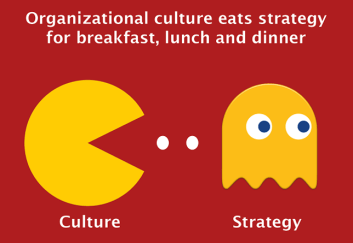
A number of presenters at #CoSN17 circled their 1:1 initiatives back to the importance of district culture in their successes and failures.  And it’s this culture that may be the determining factor in regulating the strategies (and corresponding pace) of change in a school.  Dr. Tom Ryan @ElearnTom of the eLearn Institute suggested change will be more successful if it’s within a context where “the system can tolerate” the change.  The distinct culture of each district will tolerate a different pace of change and school leaders must be cognizant of this culture when implementing 1:1 (or, for that matter, any educational or educational technology initiative).
Culture
“Culture trumps strategy & culture trumps vision” – Gene Kirchner, Fort Thomas IS

Otherwise, “culture trumps strategy and culture trumps vision” with any change initiative, as Gene Kirchner @KirchnerGene, superintendent of Fort Thomas Independent Schools in northern Kentucky, put it (see slide right). If culture is ignored, it will not matter what strategy, vision, operational plan, or technology is used – the initiative will suffer.

So perhaps there is no right pace of change in schools – the pace may simply vary by the culture of the district.  However, there are still some universal directions all districts should consider, regardless of their distinct cultures:

  1. Initiatives must be student-driven. I understand this statement at face is self-evident.  However, while it is important to build capacity of all of the adults supporting those students, this capacity-building cannot be at the expense of the needs of students.  As noted earlier, a learning moment lost with a student is a moment that can never be recovered.
  2. Simply doing nothing and making excuses about why we CAN’T move forward with digital transformation and new learning models is not an option.  As Beth McKinney @bethmckinney of Athens City School District in Alabama correctly said in her district’s presentation at #CoSN17, “The speed at which you move doesn’t matter – just move!”

“Teaming” Up to Change Learning With Collaboration Tools

In private enterprises, a new set of collaboration tools are emerging that are having a significant impact on how business is conducted.  And, interestingly, these new tools are evolving so quickly, no one is quite sure what to call them.  Names such as “team collaboration tools,” “persistent group chat/collaboration,” and “group messaging” have been suggested.  Communications industry analyst @DaveMichels wrote about this “modality with no name” – originally calling these systems “Workstream Communications and Collaboration,” but now calling them “workstream messaging.”

These new collaboration tools – whatever we are going to call them – have a couple of distinct features:

  1. They tend to organize workflow primarily by project or activity rather than other variables (particularly time).
  2. They have become modality agnostic – they tend to combine (text) messaging, voice calling, video calling, and a resource repository in one virtual space, but segmented by distinct project.
  3. They are very largely mobile friendly.

Some of the current notable brands in this “team collaboration” virtual world are Cisco Spark, Slack, and Microsoft Teams.  Amazon just recently announced its entry into the game with the release of Chime.

slack-screen-shot
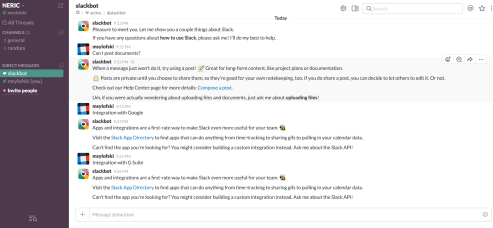
Slack – Using “Channels” to segment projects

In education, use of these tools is still largely in its infancy.  However, the potential of these systems to broaden the reach of school is quite significant:

Administrative:  All professionals involved with operating and improving our schools suffer from the same challenges as private companies – not enough time, information overload, and difficulty connecting with colleagues due to packed schedules.  Tools such as Cisco Spark and Slack can help by changing how our educators work and how we can help one another.  Rather than conducting business by a long stream of emails, a series of missed phone calls and voicemails, and in-person meetings where much is discussed but little is documented or moved forward, these tools instead can transform work by enabling groups of professionals to conduct more organized work anytime/anywhere.  Documents specific to the initiative can all be housed in the tool’s virtual “team” (Spark) or “channel” (Slack).  Collaborators can connect via phone, via video, via text – whatever is most convenient at that moment.  And all of these communications are tracked, separated, and organized by project/activity.  My team has started to use Spark as a more productive way to stay organized and connected – particularly in projects with partners outside our organization.

spark-screen-shot
Cisco Spark – Workflow through distinct “Teams”

Instructional:  If we are trying to find impactful ways to enable student collaboration, we can look no further than to some of the tools that our businesses and higher education institutions have been embracing.  These “workstream messaging” tools will allow students to dynamically connect with peers in a robust, safe, and secure environment on iphonecollaborative projects – but still with active teacher facilitation within these team/channels.  Plus, because these platforms have been built for use on mobile devices, students can participate in learning activities using a device: 1. that is personal and most already have, 2. are very comfortable using, and 3. will be using in college or the workforce going forward.

This all said, these tools in and of themselves are not the full answer.  There are two additional components we need as educators in order to pull it all together:

  1. Integration with other, more-learning centric platforms. Google recently announced the integration of Slack with G Suite.  Cisco Spark is being integrated with leading learning management systems (our team has started looking at integrations with LMSs like Schoology).  A combination of a content or learning management system with a robust workstream messaging platform is powerful for collaboration.
  2. We need to better understand pedagogically how to shift instruction to include meaningful student-driven collaborative activities. While educators agree about the importance of students gaining collaboration as a skill, they often struggle with how to design activities within the classroom to build that skill.

I’m not sure where this is all going, but I’m encouraged by the initial direction and evolution of workstream messaging applications to transform how we work.  I’m hoping we will soon have more context and more feedback to see how these tools impact how students collaborate and learn.

Bringing a “Spark” to the Classroom?

A few of us had an opportunity this past week to get a hands-on demo of Cisco’s new Spark Board.  The product is getting a bunch of buzz in the enterprise marketplace (see here, here, and here) – to a large extent, as an electronic replacement for the dry-erase whiteboard.  Interestingly, in K-12, it is potentially more of a replacement for the interactive whiteboard – most K-12 classrooms moved past the dry-erase board some time ago.

Cisco is positioning the Spark Board as an “all-in-one” device serving three primary functions: wireless presentation, digital whiteboard, and audio/video conferencing.  At the core of the Spark Board is its integration with the Cisco Spark platform, a communications and collaboration tool that may require its own blog posting at some point (it’s deep).  While the Spark Board does not require you to use Spark, the device is only a (expensive) digital whiteboard without it – so it really only makes sense to use Spark if you are using the Spark Board.  Spark can be downloaded for free, although there are a number of limitations with the free version versus the enterprise flavor.

sparkboard-1

What we saw this past week was the “first-generation” Spark Board, so it is hard to make broad conclusions about this device for K-12 – but a few initial thoughts based on the demo:

  • The look and feel of the device is engaging. Others have described the look of it as a “big iPad” and there is much truth to that description (see above).
  • The device only requires one cable to operate – a power cable. When integrated with Spark, all content can be delivered wirelessly.  (The devil is still in the details about how Spark is technically rolled out though).  If we want our classroom/learning spaces to become more active and flexible – and to do so in some school buildings constructed long before the introduction of modern technologies – the near-untethered nature of the Spark Board is impressive.
  • The attention to the user experience in the Spark Board design appears to differentiate from other devices. The device is 4k capable, positioning it for very high-quality video.  The camera is also high-quality (1080p at 60 frames per second).  There are 12 microphones built into the Board, allowing for coverage up to 45 feet away – a great fit for a standard classroom.  Also, the Board has gain control – as users move closer or further away from the board, the volume adjusts to accommodate for the changes in distance.
sparkboard-4
Wireless presentation – mirroring content between Spark Board & user device

Particularly valuable is the attention to the user experience at the far end.  Too often, far-end participants get a less quality experience in applications like distance learning and videoconferencing because the technology at the hosting end is substandard.  Cisco seems to have considered the far-end in the Spark Board design to provide as much equity in experience as possible.

Because the device is “first-generation,” there are some key functions it currently is missing.  Cisco claims a number of these features will become available in a new release of the Spark Board’s firmware at the end of March:

  • Users can not currently annotate over content – a must-have going forward.
  • Camera is fixed today – “Speaker-track” like features (where the camera will follow the speaker) are coming per Cisco.
  • Audio is not passed through the Spark interface itself or the auxiliary HDMI cable – so displaying content with audio is not available yet.
  • Only the 55” version of the Spark Board is available today – most standard classrooms would require the 70” version that is forthcoming.

One final point I found interesting – Cisco was asked whether pushed content can be modified on the Spark Board itself.  The answer is no.  Content can only be modified within the native applications on the device(s) connecting to the Spark Board through Spark (laptop, tablet, etc.).  @Jared Heiner from Cisco indicated this was intentional – if the board requires a connected computer to operate, it provides another point of technical management and failure, and it further perpetuates a need for the user to stay at the board (i.e. in the front of the room) to operate it.  If we are trying to move towards more student-driven and less teacher-centric learning spaces, this shift away from standing near to the board make sense.  That said, the pedagogical shifts needed from some instructors could create challenges with adoption – the concept of not having a computer directly attached to your interactive board requires a shift in mindset and will likely make a number of teachers and schools uncomfortable at the outset.

There are still a number of other questions to consider in the short- to medium-term:

  • Cost – The board itself is on the higher end of similar devices ($4,999 list for the 55” and $9,999 list for the forthcoming 70” display). Perhaps of greater concern are the recurring costs for device maintenance (“registration fee”) and Spark services.
  • Technical connectivity and the use of Spark – a robust wireless network is a must with this device and the devil is still in the details about how districts would roll out Spark within a school environment.
  • Size of board – will even 70” be a large enough display in a standard classroom?

Ultimately, I was impressed with the direction of the Spark Board and the quality of the device, although recognizing the device may not be ready for prime-time use in K-12 (yet).  As mentioned in an earlier blog posting, the seamless meshing of the physical space (Spark Board) with the virtual space (Spark) is huge, creating great potential to break down the walls of our classrooms and school buildings, leading to significant new learning opportunities and learning modalities in our schools.  It will be interesting to see if the Spark Board will evolve in such a way to make it more feasible (technically, fiscally, and pedagogically) for broad use in schools.

sparkboard-5
My chance to try out to new Cisco Spark Board
sparkboard-2
Josh Whitham of Cisco demonstrates the new Spark Board

The Death of the Interactive Whiteboard?

There has been a good deal of discussion recently in K-12 education about the next generation of “interactive whiteboards (IWBs).”  Many IWBs purchased during the initial wave in 2006-2010 from SMART, Promethean, etc. have aged out and – in New York State – a number of districts have been considering replacements through their Smart Schools Bond Act funding allocations and/or capital/technology bond projects.

There are three significant concerns I’m feeling about these next generation boards:

  1. Are instructors any more prepared to teach with a next generation IWB as they were with first generation systems? While I’ve seen some great use of IWBs to engage students and better illustrate many learning objects, I’ve also seen and schools have talked about too many instances where the IWB was a glorified whiteboard/chalkboard/overhead projector.
  2. What truly makes them different from the older IWBs? Sure, their “touch-enabledness” is more robust, they have more abilities for multi-users, wireless screen sharing is becoming more standard, many are equipped with a basic webcam/microphone – but are they really helping to transform learning spaces and pedagogy?
  3. If we are trying to move towards more student-driven, active learning spaces, aren’t IWBs (new, old, whatever) further perpetuating a teacher-centered model – teachers standing and delivering from the front of the room, just now with a fancier screen or projector?

Ultimately, if the older IWB’s made a marginal difference (at best), what makes this new generation of IWB’s truly any different?

This all said, there are some interesting new “interactive whiteboards” coming to market that I don’t think are truly IWBs  In fact, there’s even a question about what to call these technologies (Team collaboration device?  Visual collaboration device?  Cloud-attach device?  Ideation unit?  Giant tablet?).

1485320015990
Cisco Spark Board

This is where products such as Cisco’s new Spark Board are coming in.  I would include Google’s recently announced Jamboard as another potentially impactful product in this new market (although it would be great to learn more about when it will be available for purchase in schools, can we trial it?).  In private enterprise, the Microsoft Surface Hub is considered another product in this category – with linkages to the Microsoft virtual ecosystem of Skype for Business, Office 365, etc..  This device has just not seemed to catch on in K-12 for a number of possible reasons (price point, delays in bringing it to market, lack of buzz).

index
Google Jamboard

What is intriguing about these products is, while they are physical devices, they are intimately connected to their respective virtual platforms (Cisco Spark Board with Spark, Google Jamboard with G Suite).  The best description I’ve heard for these devices is from @LetsDoVideo  (David Maldow) – he said the Spark Board is “not a device. It’s a physical manifestation of a Spark workspace.”

When districts and teachers are thinking about replacements for IWB’s, perhaps we should be thinking more about this concept of directly linking physical spaces to virtual spaces.  Considering questions such as how will these new devices link our classrooms to the virtual platforms we’re using?  How do these devices further break down the walls of our classrooms and allow our students to connect and collaborate natively with other classrooms, community members, peers in other neighborhoods, communities, states, and countries?

Devices such as the Spark Board and (potentially) the Jamboard appear to do this – or at least the vision behind these devices seem to point to this: seamlessly linking the physical with the virtual/collaboration worlds, rather than simply replacing an older IWB with a new flavor that essentially does the same things.

As a starting point, I’m looking forward to an opportunity this week to actually get my hands on a Spark Board to being to see if it delivers on its promise (more to follow).  Based on what has been shared to date about the product, I have significant reservations the device will be an affordable fit for K-12 schools – but I am excited to see the potential this new class of products could have over time to help transform our learning spaces.